产品描述 Product Introduction
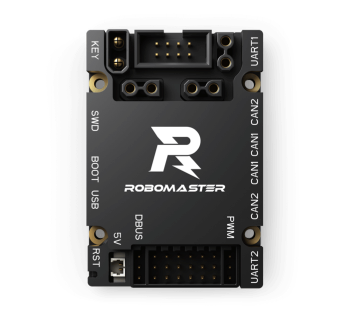
RoboMaster 开发板 C 型采用高性能的 STM32 主控芯片,结构紧凑,接口丰富,集成高精度 IMU 传感器,保护功能强,配套步兵机器人专用例程,专为 RoboMaster 比赛步兵机器人量身打造,同时也可广泛应用在科研教育、自动化设备等领域。
Equipped with a high-performance STM32 main controller, the RoboMaster Development Board Type C features a compact structure, rich interfaces, an integrated high-precision IMU, and strong protection, providing routines dedicated to Standard robots used in RoboMaster competition. It can also be used for applications in scientific research and education, automation equipment, and countless other professional fields.
技术参数 Technical Specifications
输入电压:8-28V
电源输入接口:1个
电源输出接口:3个
IMU+E-compass:1个
CAN总线接口:CAN1:2个;CAN2:2个
UART接口:2个
PWM接口:7个
DBUS接口:1个
USB接口:1个
IIC接口:1个
SPI接口:1个
数字摄像头接口:1个
重量:38g
尺寸:60 x 41 x 16mm
XT30电源线总长:450mm
2-pin CAN线总长:350mm
4-pin CAN线总长:350mm
SWD下载线总长:100mm
Input Voltage: 8-28V
Standby Current: 0.01A @ DC 24V
Operating Temperature: 0° to 55° C
Power Input Port: 1
Power Outlet Port: 3
IMU+E-compass: 1
CAN Port: CAN1: 2; CAN2: 2
UART Port: 2
PWM Port: 7
DBUS Port: 1
USB Port: 1
IIC Port: 1
SPI Port: 1
Digital Camera Port: 1
Weight: 38 g
Dimensions: 60×41×16 mm
XT30 Power Cable Length: 450mm
2-pin CAN Cable Length: 350mm
4-pin CAN Cable Length: 350mm
SWD Cable Length: 100mm
下载 Download
软件 Software
| 发布日期 Release Date | 下载 Download |
|---|---|
| 2020年1月9日 January 9, 2020 | RoboMaster 开发板C型出厂程序 |
文档 Documentation
| 发布日期 Release Date | 文件 Docs |
|---|---|
| 2020年1月 January 2020 | 中文版: RoboMaster 开发板 C 型用户手册.pdf English Edition: RoboMaster Development Board Type C User Manual.pdf |
| 2020年1月 January 2020 | 注:以下文件提供中英双语。 Note: The following documents are available in both Chinese and English. RoboMaster 开发板 C 型使用说明.pdf |
| 2020年1月 January 2020 | RoboMaster 开发板C型原理图&位号图 |
其他 Other
| 发布日期 Release Date | 文件 Docs |
|---|---|
| 2020年1月 January 2020 | RoboMaster 开发板 C 型.step |
常见问题 FAQ
Q:如何下载程序到开发板?
➥A:开发板支持使用 SWD 接口的调试器下载程序,如 J-link、ST-link 等;或者配置 BOOT 引脚进入 DFU 模式,通过 USB 下载程序,具体操作请参考《 RoboMaster 开发板 C 型用户手册》 。
Q:开发板 SWD 口烧录程序失败怎么办?
➥A:
1、检查 SWD 下载线是否正确可靠连接;
2、检查开发板是否正常供电;
3、检查 SWD 下载配置是否正确。
Q :开发板可以使用 3S 供电吗?
➥A :支持。开发板支持 8-28 V的直流电源输入,请参考《 RoboMaster 开发板 C 型使用说明》使用正常的电源供电。
Q:开发板是否有配套例程?
➥A :RoboMaster 在 Github 开源平台为用户提供了适配开发板 C 型的丰富的教程与开源例程,用户可前往 www.github.com/robomaster 进一步了解。
Q:开发板出厂是否已烧录 demo 程序?
➥A:开发板出厂时已烧录了 RoboMaster 开发板 C 型出厂程序,用户也可以自行到官网下载。
Q:开发板某些外设使用出现问题怎么办?
➥A:请参考配套例程进行实验,如官方例程仍无法正常使用,请联系售后进行维修。
Q:开发板支持用户摄像头输入吗?
➥A:开发板支持 DCMI 的数字摄像头输入,详细接口说明请参考《 RoboMaster 开发板 C 型用户手册》。
Q: How can I download programs to the development board?
➥A: Use a debugger with an SWD port such as J-link or ST-link to download programs to the
RoboMaster Development Board Type C. Alternatively, users can download programs
via USB port by configuring BOOT pins and entering DFU mode.
Q: What can I do if programs fail to download through the SWD port?
➥A:
1. Make sure the SWD download cable is connected properly;
2. Make sure the development board is powered normally;
3. Make sure the SWD download configuration is correct.
Q:Can I power the development board with a 3S Li-Po?
➥A: Yes. The RoboMaster Development Board Type C supports 8-28V DC power supply. For more information, please refer to the "RoboMaster Development Board Type C User Manual."
Q: Does the RoboMaster Development Board Type C support any example programs?
➥A: Yes. RoboMaster offers various tutorials and open source example programs for users on the Github platform. For more information, please go to www.github.com/robomaster.
Q: Does the development board have any factory demo programs pre-installed?
➥A: The RoboMaster Development Board Type C already contains pre-installed factory programs before shipment, which can also be downloaded from the official website.
Q: What should I do if certain peripherals of the development board do not work?
➥A: Test with the corresponding official example program. If the test fails, please contact our aftersales service for repair.
Q: Does the development board support a camera input?
➥A: Yes. The development board can be connected with a camera via the DCMI port. For more
detailed information, please refer to the“RoboMaster Development Board Type C
User Manual.”